
Función de Terminación de Llamadas Telefónicas IP y Guía de Configuración

Introducción

Descripción general

La finalización de llamada es una función que muestra opciones al teléfono local para re-marcar, devolver la llamada manualmente o cancelar cuando la parte llamada está ocupada o rechaza la llamada.

Modelos aplicables

Este documento se aplica a modelos que incluyen BX3S y BX4. Las series BX5S y BX6 actualmente NO son compatibles con la función de finalización de llamada.

Público objetivo

Este documento está destinado a los evaluadores internos de la empresa que necesitan comprender y verificar rápidamente la función de finalización de llamada.

Descripción de la función de finalización de llamada

Cuando la función de finalización de llamada está habilitada con el re-marcado automático por señalización activado, el teléfono mostrará los mensajes Call Completion Waiting xxx y Call Completion Calling xxx si la parte llamada está ocupada o rechaza la llamada (código de rechazo: 486). El teléfono monitorea el estado de disponibilidad de la parte llamada mediante señalización SIP (notify: terminated), lo que permite a los usuarios devolver la llamada manualmente o cancelar la solicitud.

Cuando la finalización de llamada está deshabilitada, el teléfono NO mostrará las ventanas emergentes Call Completion Waiting xxx y Call Completion Calling xxx.

Guía de configuración de finalización de llamada

1. La finalización de llamada se encuentra en la sección del archivo de configuración:

Nota: Las series BX5S y BX6 no son compatibles con la función de finalización de llamada; el archivo de configuración contiene el ajuste P1 Call Complete: 0.
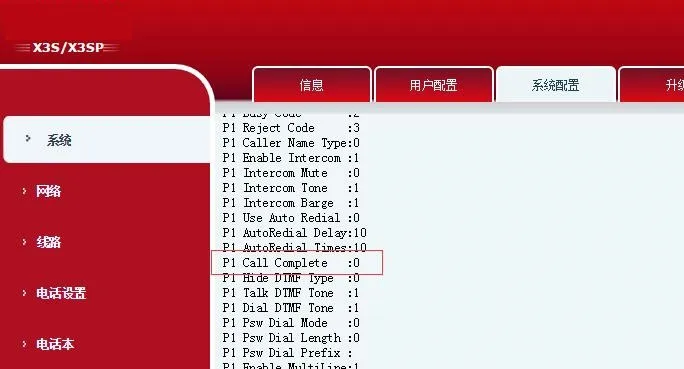
Call Completion Display in Configuration File Interface

Nombre del parámetroDescripción del parámetro
P1 Call CompleteHabilita o deshabilita la función Call Complete. Valor 1: Cuando la parte llamada cambia de ocupado a disponible, el teléfono solicita devolución de llamada manual o cancelación. Valor 0: Deshabilita la función. (Predeterminado: 0 para BX3/BX4; BX5/BX6 no son compatibles con esta función)


2. Ruta en la interfaz web: Phone Settings - Features - General Settings. Active o desactive la casilla Call Completion para habilitar o deshabilitar la función.
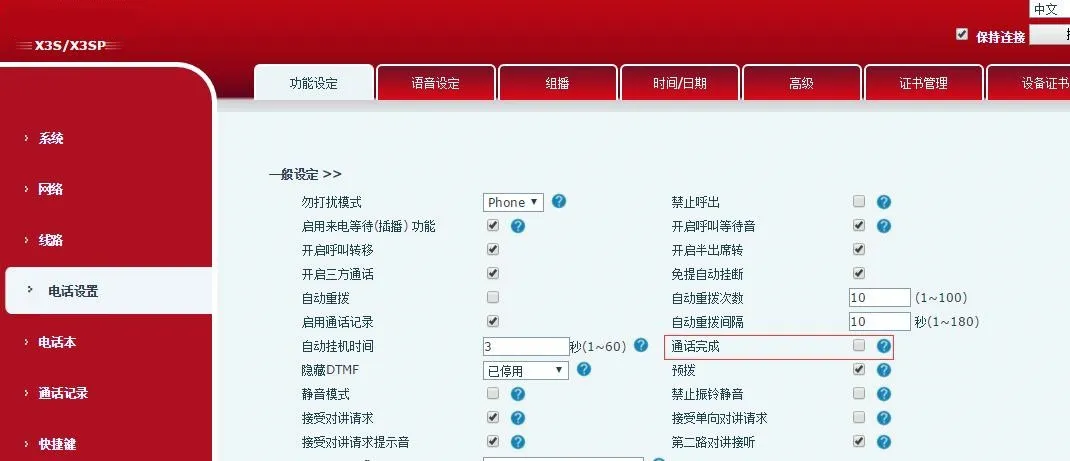
Call Completion Location in Web Interface

3. Ruta en la interfaz LCD: Menu - Features - Call Completion
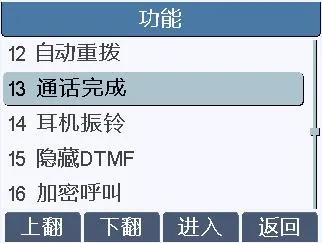
Call Completion Location in LCD Interface

Presione Enter para acceder a la configuración, luego seleccione On o Off para habilitar o deshabilitar la función.
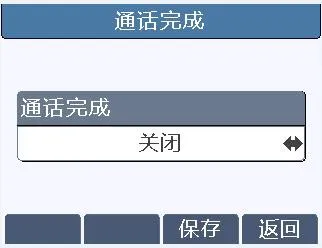
Enable or Disable Call Completion Settings

Guía del usuario de finalización de llamada

La parte llamada está ocupada (Llamada en espera deshabilitada)

1. Habilite Call Completion en el teléfono de prueba (a través de Web - Phone Settings - Features - General Settings o LCD - Menu - Features - Call Completion). Deshabilite Call Waiting en el teléfono B objetivo.

2. El teléfono B está en una llamada con el teléfono C. El teléfono de prueba llama al teléfono B en modo manos libres, auricular o cascos. El teléfono de prueba muestra la ventana emergente Call Completion Waiting xxx (xxx = número del teléfono B), como se muestra a continuación:
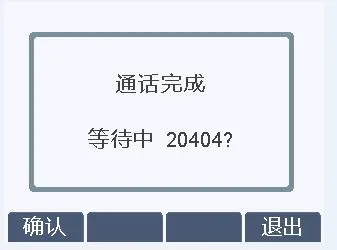
Phone displays 'Call Completion Waiting xxx' pop-up

3. Operaciones para la ventana emergente Call Completion Waiting xxx:

(1) Presione Cancel: El teléfono sale de la pantalla de espera y vuelve al estado inactivo. No aparecerá ninguna indicación de devolución de llamada cuando el teléfono B quede libre.

(2) Presione OK: El teléfono sale de la pantalla de espera y vuelve al estado inactivo. Aproximadamente 30 segundos después de que el teléfono B quede libre, el teléfono de prueba muestra la ventana emergente Call Completion Calling xxx:
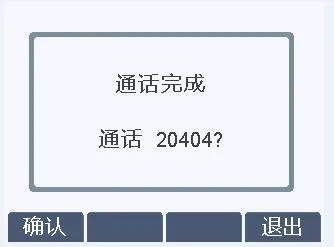
Call Completion Waiting pop-up

Presione Cancel: No se realiza ninguna llamada, regresa al estado inactivo.

Presione OK: La captura de paquetes SIP muestra que el par envía Notify (terminated). El teléfono de prueba volverá a marcar al teléfono B para establecer una llamada normal.
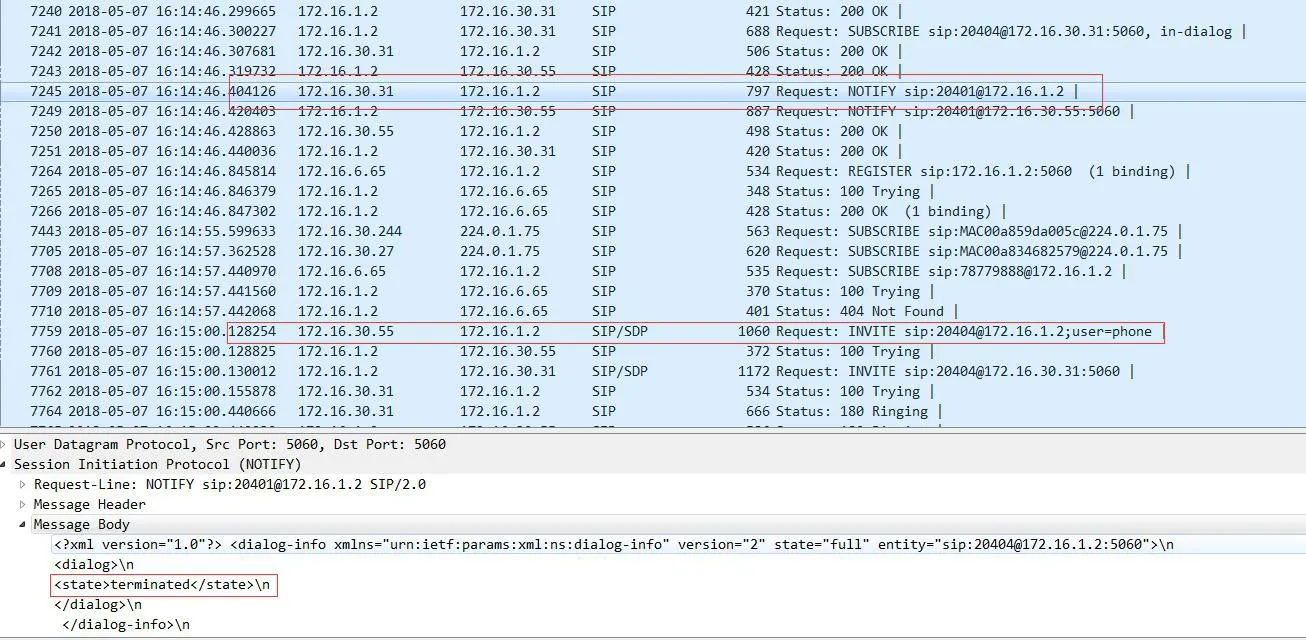
SIP Packet Capture Filter

La parte llamada rechaza la llamada (Código de rechazo: 486)

1. Habilite Call Completion en el teléfono de prueba. Configure el código de respuesta de rechazo en 486 (Busy Here) en el teléfono B objetivo.

2. El teléfono de prueba llama al teléfono B en modo manos libres, auricular o cascos. El teléfono B rechaza la llamada. El teléfono de prueba muestra la ventana emergente Call Completion Waiting xxx (xxx = número del teléfono B), como se muestra a continuación:
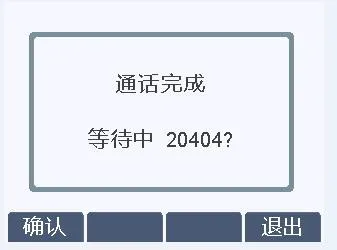
Call Completion Pop-up Interface

3. Operaciones para la ventana emergente Call Completion Waiting xxx:

(1) Presione Cancel: El teléfono sale de la pantalla de espera y vuelve al estado inactivo. No aparecerá ninguna indicación de devolución de llamada cuando el teléfono B quede libre.

(2) Presione OK: Se aplican dos escenarios:

     a) Si el teléfono B estaba en una llamada activa: Después del rechazo, el teléfono de prueba vuelve al estado inactivo. Mostrará la ventana emergente Call Completion Calling xxx aproximadamente 30 segundos después de que el teléfono B termine la llamada.

     b) Si el teléfono B estaba inactivo: Después del rechazo inmediato y volver al estado inactivo, el teléfono de prueba muestra rápidamente la ventana emergente Call Completion Calling xxx:
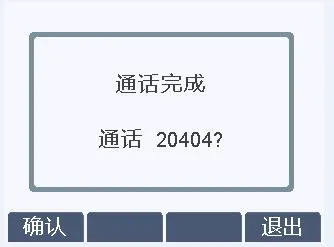
Call Completion Pop-up

Presione Cancel: No se realiza ninguna llamada, regresa al estado inactivo.

Presione OK: La captura de paquetes SIP muestra que el par envía Notify (terminated). El teléfono de prueba volverá a marcar al teléfono B para establecer una llamada normal.
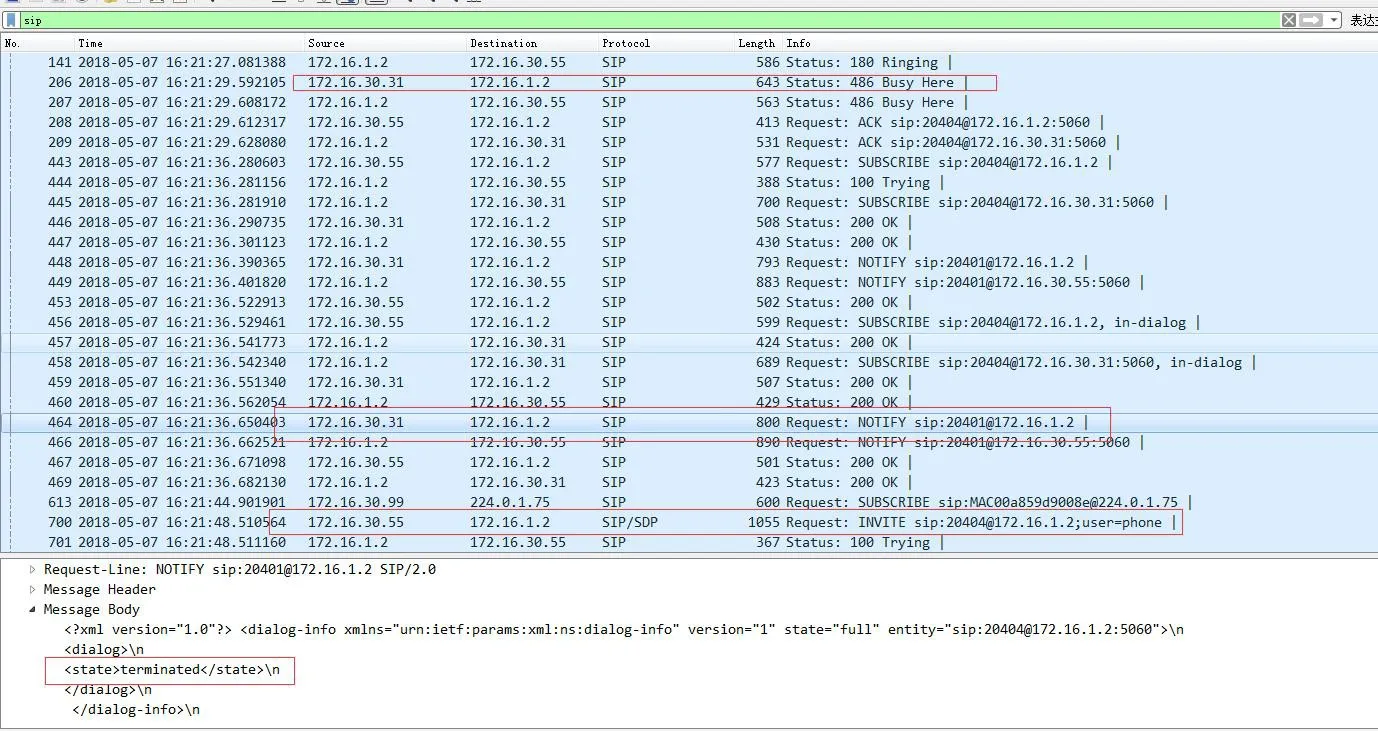

SIP Packet Capture Filter

Catálogo
Servicio al cliente Teléfono
We use cookie to improve your online experience. By continuing to browse this website, you agree to our use of cookie.

Cookies

This Cookie Policy explains how we use cookies and similar technologies when you access or use our website and related services. Please read this Policy together with our Terms and Conditions and Privacy Policy so that you understand how we collect, use, and protect information.

By continuing to access or use our Services, you acknowledge that cookies and similar technologies may be used as described in this Policy, subject to applicable law and your available choices.

Updates to This Cookie Policy

We may revise this Cookie Policy from time to time to reflect changes in legal requirements, technology, or our business practices. When we make updates, the revised version will be posted on this page and will become effective from the date of publication unless otherwise required by law.

Where required, we will provide additional notice or request your consent before applying material changes that affect your rights or choices.

What Are Cookies?

Cookies are small text files placed on your device when you visit a website or interact with certain online content. They help websites recognize your browser or device, remember your preferences, support essential functionality, and improve the overall user experience.

In this Cookie Policy, the term “cookies” also includes similar technologies such as pixels, tags, web beacons, and other tracking tools that perform comparable functions.

Why We Use Cookies

We use cookies to help our website function properly, remember user preferences, enhance website performance, understand how visitors interact with our pages, and support security, analytics, and marketing activities where permitted by law.

We use cookies to keep our website functional, secure, efficient, and more relevant to your browsing experience.

Categories of Cookies We Use

Strictly Necessary Cookies

These cookies are essential for the operation of the website and cannot be disabled in our systems where they are required to provide the service you request. They are typically set in response to actions such as setting privacy preferences, signing in, or submitting forms.

Without these cookies, certain parts of the website may not function correctly.

Functional Cookies

Functional cookies enable enhanced features and personalization, such as remembering your preferences, language settings, or previously selected options. These cookies may be set by us or by third-party providers whose services are integrated into our website.

If you disable these cookies, some services or features may not work as intended.

Performance and Analytics Cookies

These cookies help us understand how visitors use our website by collecting information such as traffic sources, page visits, navigation behavior, and general interaction patterns. In many cases, this information is aggregated and does not directly identify individual users.

We use this information to improve website performance, usability, and content relevance.

Targeting and Advertising Cookies

These cookies may be placed by our advertising or marketing partners to help deliver more relevant ads and measure the effectiveness of campaigns. They may use information about your browsing activity across different websites and services to build a profile of your interests.

These cookies generally do not store directly identifying personal information, but they may identify your browser or device.

First-Party and Third-Party Cookies

Some cookies are set directly by our website and are referred to as first-party cookies. Other cookies are set by third-party services, such as analytics providers, embedded content providers, or advertising partners, and are referred to as third-party cookies.

Third-party providers may use their own cookies in accordance with their own privacy and cookie policies.

Information Collected Through Cookies

Depending on the type of cookie used, the information collected may include browser type, device type, IP address, referring website, pages viewed, time spent on pages, clickstream behavior, and general usage patterns.

This information helps us maintain the website, improve performance, enhance security, and provide a better user experience.

Your Cookie Choices

You can control or disable cookies through your browser settings and, where available, through our cookie consent or preference management tools. Depending on your location, you may also have the right to accept or reject certain categories of cookies, especially those used for analytics, personalization, or advertising purposes.

Please note that blocking or deleting certain cookies may affect the availability, functionality, or performance of some parts of the website.

Restricting cookies may limit certain features and reduce the quality of your experience on the website.

Cookies in Mobile Applications

Where our mobile applications use cookie-like technologies, they are generally limited to those required for core functionality, security, and service delivery. Disabling these essential technologies may affect the normal operation of the application.

We do not use essential mobile application cookies to store unnecessary personal information.

How to Manage Cookies

Most web browsers allow you to manage cookies through browser settings. You can usually choose to block, delete, or receive alerts before cookies are stored. Because browser controls vary, please refer to your browser provider’s support documentation for details on how to manage cookie settings.

Contact Us

If you have any questions about this Cookie Policy or our use of cookies and similar technologies, please contact us at support@becke.cc .