
¿Cómo actualizar la estación interior i5xW en modo POST?

Introducción1.

1.1. Descripción general

 Las estaciones interiores de la serie i5xW pueden requerir actualizaciones de firmware para satisfacer necesidades específicas o corregir ciertos errores. A continuación, se detalla cómo actualizar las estaciones interiores de la serie i5xW en modo POST.

1.2. Modelos aplicables

 Estaciones interiores de la serie i5xW: i51W, i52W, i53W.

1.3. Requisitos previos

① Una estación interior de la serie i5xW (aquí se toma como ejemplo el i52W), un switch PoE (o una fuente de alimentación de CC). Conecte el dispositivo al switch.
   ② Un ordenador para la configuración; conéctelo al mismo switch, asegurándose de que la red entre el ordenador y el dispositivo sea accesible.

1.4. Diagrama de conexión del dispositivo y el ordenador

① Conecte el i52W al switch y el ordenador al mismo switch. Asegúrese de que la red entre el ordenador y el dispositivo sea accesible. El diagrama de conexión se muestra en la Figura 1.
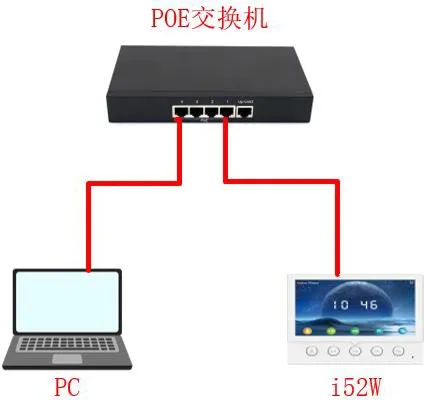
Diagrama de conexión del dispositivo y el ordenador
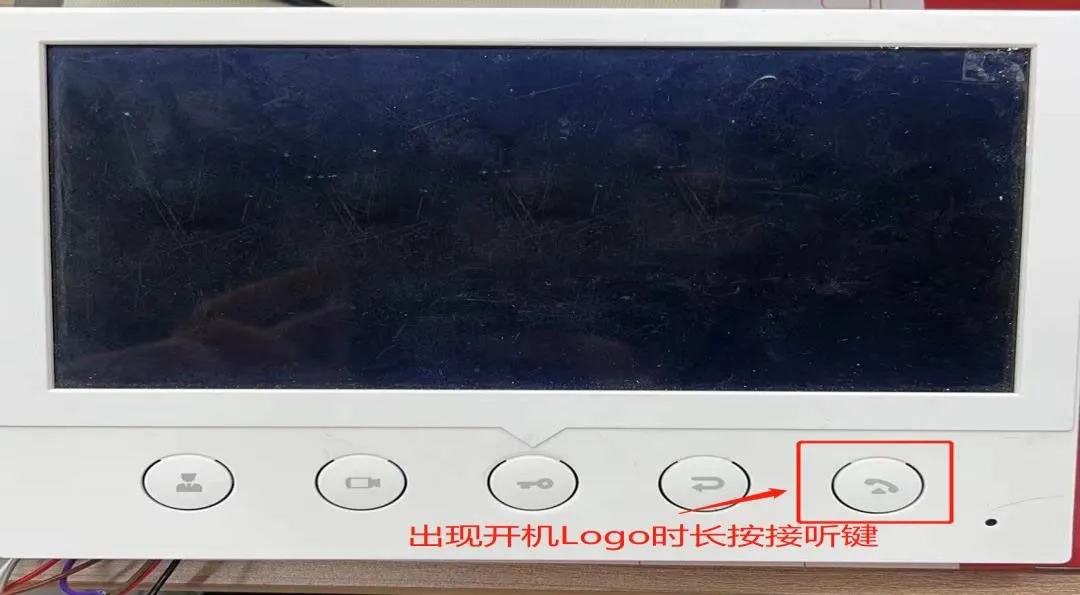
            Figura 1 Diagrama de conexión del dispositivo y el ordenador
Actualización de la estación interior i5xW en modo POST2.

Para actualizar en modo POST, el i5xW primero debe ingresar al modo POST y luego un ordenador accede a la interfaz web POST del dispositivo para realizar la actualización. Tomando el i52W como ejemplo, a continuación se detalla la actualización en modo POST para el i5xW.

2.1. Ingresar al modo POST

(1) Después de encender el i52W, cuando aparezca el logotipo de arranque, mantenga pulsado el botón de respuesta, como se muestra en la Figura 2.
Cómo ingresar al modo POST en el i52W
                                                                                                           Figura 2 Cómo ingresar al modo POST en el i52W
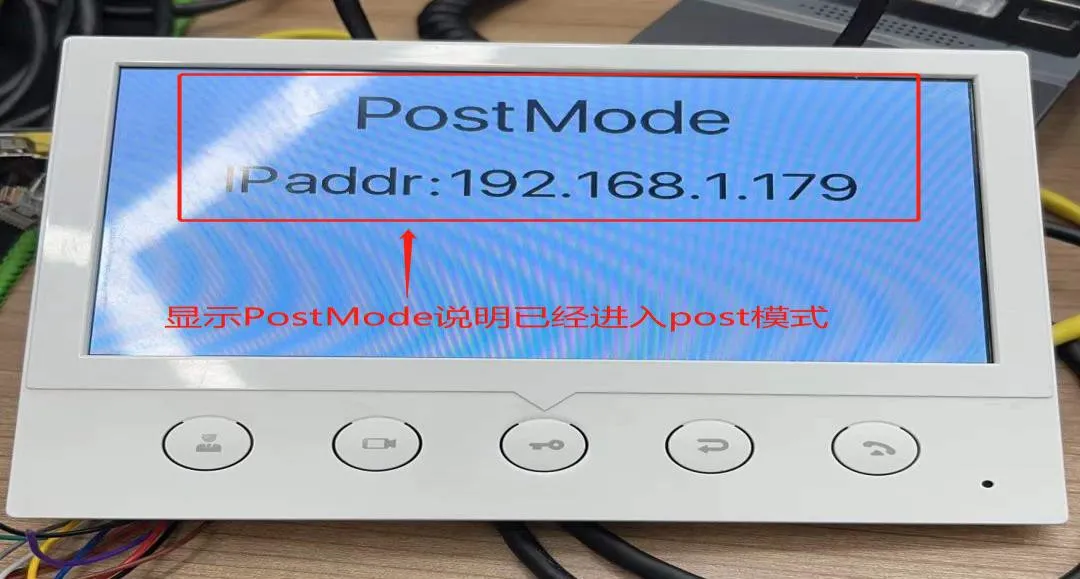
   (2) Cuando aparezca la interfaz PostMode, indica que el i52W ha ingresado correctamente al modo POST, como se muestra en la Figura 3.
i52W ingresó correctamente al modo POST
                                                                                                      Figura 3 i52W ingresó correctamente al modo POST

 2.2. Actualizar el firmware en modo POST

Una vez que el dispositivo haya ingresado al modo POST, es necesario realizar la configuración a través de la interfaz web POST. Los pasos detallados son los siguientes:
(1) Acceda a la interfaz web POST: Introduzca http://192.168.1.179:8080 en el navegador para abrir la interfaz web POST.
(2) Realice la actualización: En la interfaz web POST, seleccione "Upgrade Software", luego elija el archivo de firmware correspondiente y haga clic en "Upgrade" para iniciar la actualización, como se muestra en la Figura 4.
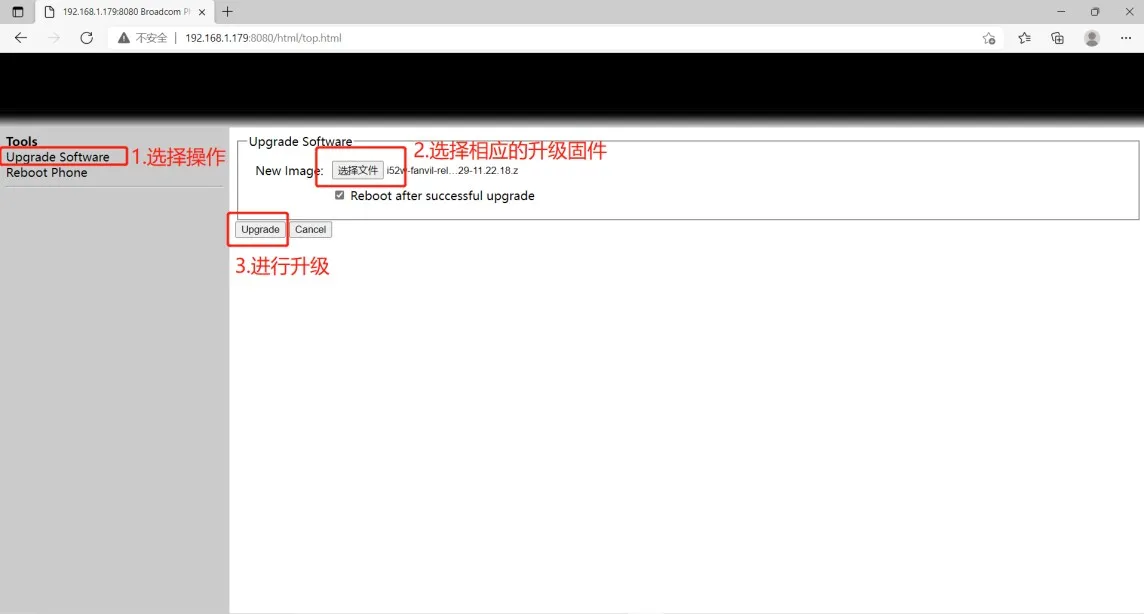
Configuración de la interfaz web POST 
                                                                                                             Figura 4 Configuración de la interfaz web POST
(3) Espere a que la actualización se complete; el dispositivo se reiniciará automáticamente.
(4) Compruebe si la versión del firmware se ha actualizado a la versión de destino. Si no es así, puede volver a actualizar; si es así, la actualización se habrá realizado correctamente.
Lo anterior describe el proceso de actualización en modo POST para las estaciones interiores de la serie i5xW.

Catálogo
Servicio al cliente Teléfono
We use cookie to improve your online experience. By continuing to browse this website, you agree to our use of cookie.

Cookies

This Cookie Policy explains how we use cookies and similar technologies when you access or use our website and related services. Please read this Policy together with our Terms and Conditions and Privacy Policy so that you understand how we collect, use, and protect information.

By continuing to access or use our Services, you acknowledge that cookies and similar technologies may be used as described in this Policy, subject to applicable law and your available choices.

Updates to This Cookie Policy

We may revise this Cookie Policy from time to time to reflect changes in legal requirements, technology, or our business practices. When we make updates, the revised version will be posted on this page and will become effective from the date of publication unless otherwise required by law.

Where required, we will provide additional notice or request your consent before applying material changes that affect your rights or choices.

What Are Cookies?

Cookies are small text files placed on your device when you visit a website or interact with certain online content. They help websites recognize your browser or device, remember your preferences, support essential functionality, and improve the overall user experience.

In this Cookie Policy, the term “cookies” also includes similar technologies such as pixels, tags, web beacons, and other tracking tools that perform comparable functions.

Why We Use Cookies

We use cookies to help our website function properly, remember user preferences, enhance website performance, understand how visitors interact with our pages, and support security, analytics, and marketing activities where permitted by law.

We use cookies to keep our website functional, secure, efficient, and more relevant to your browsing experience.

Categories of Cookies We Use

Strictly Necessary Cookies

These cookies are essential for the operation of the website and cannot be disabled in our systems where they are required to provide the service you request. They are typically set in response to actions such as setting privacy preferences, signing in, or submitting forms.

Without these cookies, certain parts of the website may not function correctly.

Functional Cookies

Functional cookies enable enhanced features and personalization, such as remembering your preferences, language settings, or previously selected options. These cookies may be set by us or by third-party providers whose services are integrated into our website.

If you disable these cookies, some services or features may not work as intended.

Performance and Analytics Cookies

These cookies help us understand how visitors use our website by collecting information such as traffic sources, page visits, navigation behavior, and general interaction patterns. In many cases, this information is aggregated and does not directly identify individual users.

We use this information to improve website performance, usability, and content relevance.

Targeting and Advertising Cookies

These cookies may be placed by our advertising or marketing partners to help deliver more relevant ads and measure the effectiveness of campaigns. They may use information about your browsing activity across different websites and services to build a profile of your interests.

These cookies generally do not store directly identifying personal information, but they may identify your browser or device.

First-Party and Third-Party Cookies

Some cookies are set directly by our website and are referred to as first-party cookies. Other cookies are set by third-party services, such as analytics providers, embedded content providers, or advertising partners, and are referred to as third-party cookies.

Third-party providers may use their own cookies in accordance with their own privacy and cookie policies.

Information Collected Through Cookies

Depending on the type of cookie used, the information collected may include browser type, device type, IP address, referring website, pages viewed, time spent on pages, clickstream behavior, and general usage patterns.

This information helps us maintain the website, improve performance, enhance security, and provide a better user experience.

Your Cookie Choices

You can control or disable cookies through your browser settings and, where available, through our cookie consent or preference management tools. Depending on your location, you may also have the right to accept or reject certain categories of cookies, especially those used for analytics, personalization, or advertising purposes.

Please note that blocking or deleting certain cookies may affect the availability, functionality, or performance of some parts of the website.

Restricting cookies may limit certain features and reduce the quality of your experience on the website.

Cookies in Mobile Applications

Where our mobile applications use cookie-like technologies, they are generally limited to those required for core functionality, security, and service delivery. Disabling these essential technologies may affect the normal operation of the application.

We do not use essential mobile application cookies to store unnecessary personal information.

How to Manage Cookies

Most web browsers allow you to manage cookies through browser settings. You can usually choose to block, delete, or receive alerts before cookies are stored. Because browser controls vary, please refer to your browser provider’s support documentation for details on how to manage cookie settings.

Contact Us

If you have any questions about this Cookie Policy or our use of cookies and similar technologies, please contact us at support@becke.cc .