
×

Producto

Producto

Usando la tecnología de primer nivel de Baker para crear experiencias excepcionales para personas, entornos y cosas.

Aprende más

Punto de contacto

Punto de contacto

Además de los dispositivos terminales, también se debe considerar todo el personal, los lugares y las cosas conectadas a la red.

Aprende más
Contacte con nosotros
Enciclopedia
2026-04-17 17:47:33
¿Qué Es El Navegador XML? Aplicaciones De Teléfono IP Extendidas Explicadas
Aprenda qué es un navegador XML en un teléfono IP, cómo funciona, qué funciones admite y cómo habilita aplicaciones telefónicas extendidas como directorios, mensajes, interfaces de control y servicios comerciales persona

Becke Telcom

¿Qué Es El Navegador XML? Aplicaciones De Teléfono IP Extendidas Explicadas

An XML Browser on an IP phone is a lightweight application interface that allows the phone to load, display, and interact with XML-based service pages delivered from a web server. Instead of acting like a full desktop web browser, it is usually designed to render a limited set of predefined XML objects, menu structures, text screens, input forms, directories, images, and execution commands that the phone firmware understands. In practical terms, it extends the phone from a voice endpoint into a small service terminal that can present custom business functions directly on the screen.

This capability became important in enterprise and service-provider telephony because standard SIP phones often needed more than dial tone, caller ID, and voicemail. Organizations wanted phones to access corporate directories, display internal notices, support extension mobility, trigger workflow actions, show room or status information, and integrate with back-end systems. XML Browser technology provided a structured way to deliver these extended functions without turning the phone into a full computer or requiring a heavy operating environment on every endpoint.

Understanding XML Browser on IP Phones

What XML Browser Means in This Context

In the IP phone world, XML Browser usually refers to a built-in client function that interprets XML objects sent by an application server. These XML objects define what the phone should display and how the user can interact with it. Depending on the vendor and model, the supported objects may include text pages, menus, input screens, directories, status windows, images, icon menus, or execution commands.

This is why the term can be confusing to people outside telecom. It is called a browser, but it is not intended to browse the general internet in the same way as Chrome, Safari, or Edge. It typically does not aim to render complex HTML, modern JavaScript, or arbitrary web layouts. Instead, it works inside a controlled XML application model created specifically for the phone platform and its keys, display, and firmware behavior.

Why IP Phones Use XML Instead of Full Web Pages

Traditional desk phones and many SIP handsets have limited screen size, limited memory, fixed keys, and focused operating logic. Because of that, a compact XML-based interface is more practical than a general-purpose browser engine. The phone only needs to understand a controlled set of objects and actions rather than support the entire modern web stack.

This approach also improves predictability. The service developer knows the phone will interpret a defined set of objects rather than trying to adapt responsive HTML pages to a small display with vendor-specific behavior. As a result, XML Browser applications are usually more stable, easier to standardize, and better aligned with the practical use model of enterprise voice endpoints.

In other words, XML Browser technology is not about making the phone behave like a PC. It is about making the phone useful for focused on-screen services that fit business communication workflows.

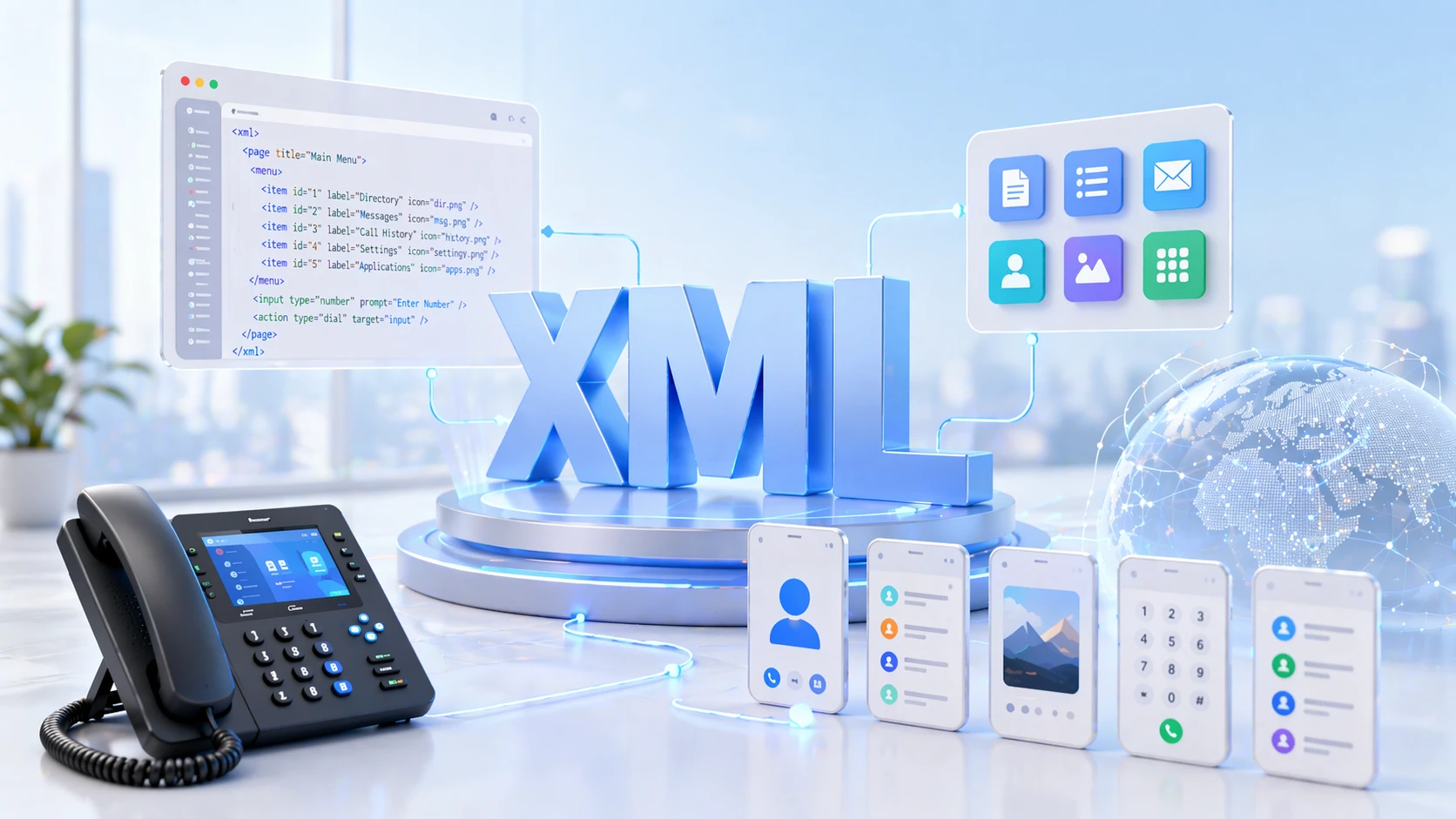
IP phone XML Browser displaying a custom service menu with directory, messages, and business application shortcuts

XML Browser technology allows an IP phone to load structured on-screen services such as directories, messages, menus, and custom business functions.

How XML Browser Works

Server, Phone, and XML Object Interaction

The typical XML Browser model includes three parts: the IP phone, a web-accessible application server, and the XML content itself. When the user presses a service key, selects a menu item, or triggers a configured service URL, the phone sends a request to the server over HTTP or HTTPS. The server then returns an XML document formatted according to the vendor’s supported schema or object set. The phone parses that XML and renders the resulting screen or action.

The XML content may define a menu, display text, present user input fields, show directory entries, display icons or images, or instruct the phone to execute a specific URI or operation. This creates a simple but powerful interaction loop: the user performs an action on the phone, the phone calls the server, the server returns XML, and the phone updates the interface accordingly.

User Input, Navigation, and Action Handling

Many XML Browser applications are interactive rather than purely informational. A user can select a menu item, search a directory, enter digits or text, trigger a call-related action, or navigate to another service screen. The server can generate XML dynamically based on that input, which allows the application to behave more like a service workflow than a static page.

Because the interface is structured around keys, line buttons, softkeys, and small displays, navigation is usually designed to be simple and task-oriented. This is one reason XML Browser applications work well for corporate directories, announcements, quick forms, room status displays, paging controls, hotel services, or internal help functions. They are optimized for short interactions from a voice endpoint rather than long browsing sessions.

An XML Browser extends an IP phone not by turning it into a general computer, but by giving it a controlled way to request, display, and act on service data from a server.

Core Functions of XML Browser Applications

Menus, Text Screens, Directories, and Input Forms

One of the most common XML Browser functions is menu presentation. The phone can display service menus that let users select internal tools, lookup functions, or navigation paths. Text screens are also common and are often used for notices, instructions, alerts, information pages, and simple status messages. Directory functions allow the phone to present contact lists, search results, or internal extensions in a structured way that fits the phone screen.

Input screens add another layer of value because they allow the user to type or enter digits, search parameters, or selection values. That makes the phone useful for lightweight transactional tasks. A user might search the corporate phonebook, log into a shared extension, request a room service function, confirm a workflow option, or enter an ID for a controlled process. These are small actions, but they can be very useful when brought directly to the phone interface.

Image Display, Messages, and Triggered Actions

Depending on the vendor and model family, XML Browser capabilities may also include image display, icon-based menus, status windows, push messages, and execution commands. This allows phones to show simple branding, visual alerts, message content, instruction screens, or controlled actions initiated by the service logic. Some platforms also support features such as call-related URIs, display control, key actions, audio prompts, or service shortcuts integrated with phone buttons.

These capabilities are what make XML Browser useful beyond simple text display. Instead of acting only as a remote noticeboard, the phone can become a front end for selected operational tasks. That is particularly valuable in environments where users already have a desk phone in front of them and where quick-access service functions improve responsiveness or reduce training friction.

The exact feature set always depends on the specific phone platform. XML Browser technology should therefore be understood as a category of capability rather than one perfectly identical standard implementation across all vendors.

Extended IP Phone Applications Explained

Why “Extended Applications” Matter

The phrase extended IP phone applications refers to services that go beyond the phone’s core calling features. A normal SIP phone can register, make calls, receive calls, hold, transfer, and show line information. An XML Browser-enabled phone can do more. It can become an access point for directories, internal workflow tools, visual notifications, hospitality services, paging controls, messaging features, extension mobility functions, and other task-focused applications.

This extended model is valuable because the IP phone is already a trusted, always-on endpoint located where the user works. Instead of asking the user to open another application on a separate device for every minor task, the phone can present selected functions directly. For administrators, that can simplify user behavior. For end users, it can reduce friction in environments where communication actions and service actions overlap.

Examples of Practical Extended Functions

A corporate directory is one of the clearest examples. The phone can query a server and present searchable contacts or internal departments directly on screen. Another example is extension mobility, where users log into a shared or temporary phone and receive their own settings or service profile. Message services are also common, including text and image-based notices, alerts, or instructions presented directly on the endpoint.

In hotels, care facilities, campuses, factories, or reception environments, XML Browser services may support room information, shift notices, assistance menus, maintenance requests, nurse or operator lookup, or specialized call workflows. In all of these cases, the phone remains a voice device, but the XML Browser gives it a useful service layer that makes the endpoint more valuable inside the business system.

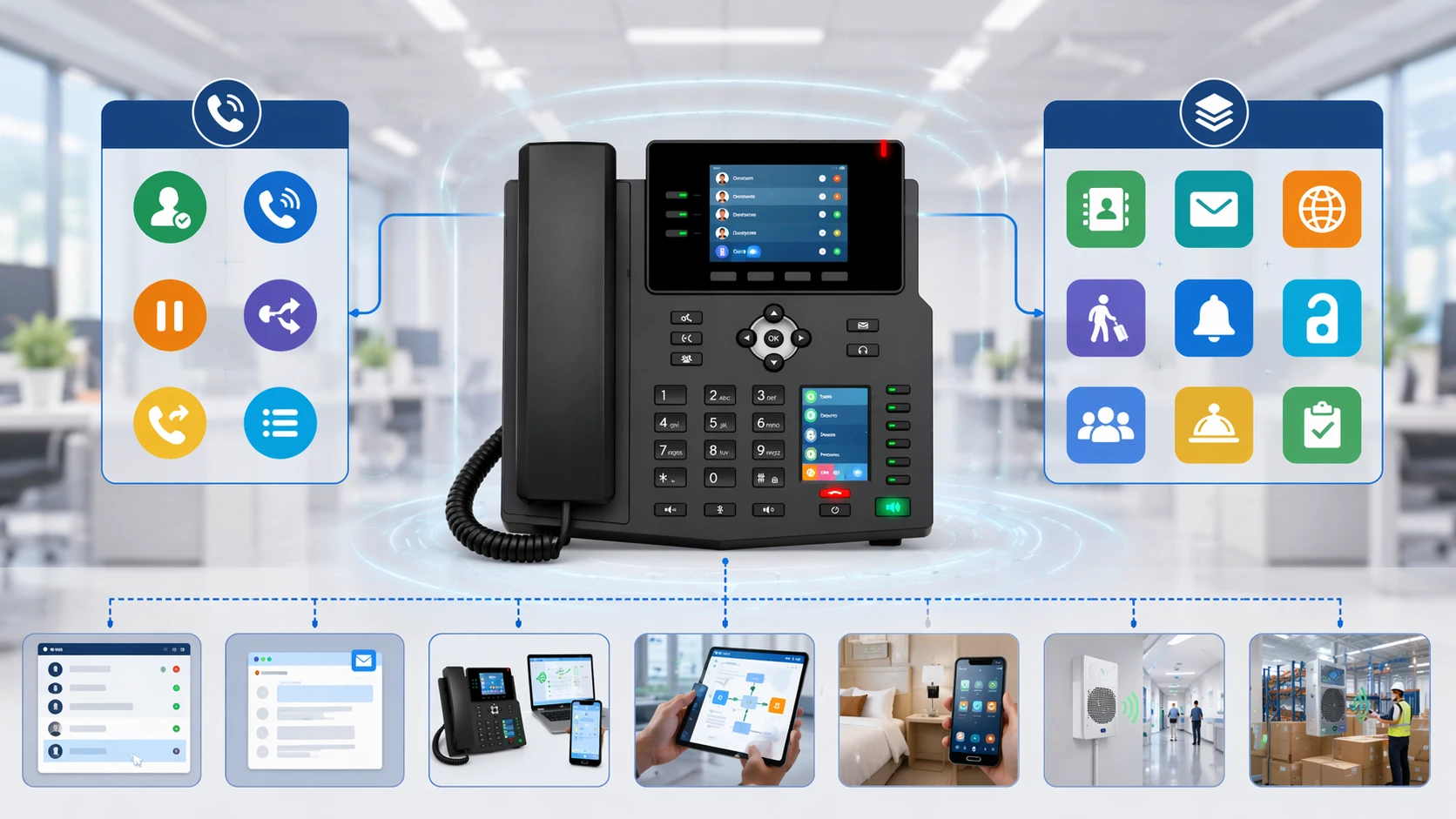
Extended IP phone applications using XML Browser for directories, messages, extension mobility, and task-based business services

XML Browser functions allow IP phones to support extended applications such as directories, messages, extension mobility, and custom task-oriented services.

System Value of XML Browser Technology

Better Use of the Phone as a Business Endpoint

One major value of XML Browser technology is that it increases the usefulness of the phone without requiring a full custom operating platform. The business can reuse an existing endpoint that is already powered, network-connected, deployed, and familiar to staff. Instead of adding another dedicated terminal for simple service tasks, the organization can expose selected applications directly on the phone.

This is especially useful in environments where employees interact constantly with voice communication and need occasional access to small, repeatable functions. Reception desks, hotel staff positions, shared office areas, branch counters, dispatch positions, and support stations can all benefit from services that are easy to reach from the phone screen itself.

Controlled Integration with Back-End Systems

Another important value is controlled integration. XML Browser applications are typically built around defined objects, fixed interaction models, and server-side logic. This makes them easier to govern than arbitrary web browsing. Administrators can decide exactly which services are exposed, which URLs are used, how the service behaves, and which phones or user profiles receive access.

That controlled model can improve security and operational consistency. The phone does not need unrestricted browser freedom to be useful. It only needs structured access to the right service functions. For organizations that want feature extension without open-ended endpoint complexity, this is a practical architectural advantage.

It also helps with lifecycle management. XML service logic usually lives on the server side, so application behavior can often be changed without replacing the phone hardware itself, as long as the firmware supports the necessary XML objects and interfaces.

The system value of XML Browser lies in turning a voice endpoint into a controlled service endpoint while keeping the interaction model simple, predictable, and aligned with the phone’s real operating role.

Common Application Scenarios

Enterprise Communications and Office Workflows

In enterprise offices, XML Browser applications are commonly used for corporate directories, internal announcements, extension mobility, custom menu shortcuts, and service access from the phone screen. This can be especially helpful in large organizations where users need quick access to internal contacts, department information, or shared calling functions without relying on a separate desktop application for every task.

It also fits well into unified communications environments where the phone is already part of a broader voice platform. XML services can act as a light presentation layer for communication-related business functions, reducing the gap between call handling and information access.

Hospitality, Healthcare, and Front-Desk Environments

Hospitality environments can use XML Browser features for guest-facing or staff-facing service shortcuts, room status information, operator menus, housekeeping updates, and quick access to internal departments. In healthcare or assisted-care settings, similar concepts may support directory lookup, staff notices, role-based menus, or lightweight access to communication workflows where simplicity matters.

Front-desk and reception scenarios also benefit because the desk phone is a central working tool in those roles. Putting the right information on the phone screen can speed up interaction, reduce context switching, and make service handling more consistent for users who rely on the phone throughout the day.

Industrial, Campus, and Specialized Service Terminals

In industrial or campus environments, XML Browser applications can be adapted for shift instructions, hotline menus, internal lookup services, dispatch-related prompts, room or building information, paging or notification triggers, and other focused interactions. These deployments are especially relevant when the phone is part of a broader communications solution and the business wants on-screen service functions without deploying separate HMI devices for simple tasks.

Specialized applications may also appear in education, logistics, government, transport, and public service settings where phones need to present information, accept controlled input, or trigger service actions that fit the local workflow. The XML Browser model is particularly useful in these cases because it is lightweight, structured, and easy to align with role-specific tasks. 

XML Browser use cases on enterprise, hospitality, healthcare, and industrial IP phone deployments

XML Browser applications are used in enterprise offices, hospitality, healthcare, campuses, and specialized service environments where the phone acts as both a voice and service endpoint.

Design Considerations and Technical Boundaries

Vendor Support and Object Compatibility

One of the most important design considerations is that XML Browser behavior varies by vendor, phone family, firmware version, and deployment platform. Not every phone supports the same XML objects, media handling, service URIs, or integration methods. Some platforms provide broad object sets with images, status windows, and execute functions, while others support a smaller set focused on text, menus, and directories.

Because of that, application planning should begin with the supported XML object list and service model of the target device family. A service that works well on one vendor’s color-screen desktop phone may need redesign or simplification on another vendor’s entry-level handset. Compatibility is not only about XML syntax. It is also about navigation behavior, key mapping, provisioning method, and the phone’s display and firmware capabilities.

Security, Provisioning, and Operational Control

XML Browser services are usually delivered over HTTP or HTTPS, and secure deployment matters. Administrators should control service URLs, protect access to application servers, prefer encrypted transport where supported, and carefully manage which phones are allowed to subscribe to or invoke specific services. In many enterprise environments, XML services are also provisioned centrally through the call-control platform or device management workflow rather than configured one phone at a time.

It is also important to keep expectations realistic. XML Browser is excellent for lightweight service applications, but it is not a replacement for a full mobile app, a desktop browser, or a rich touchscreen operating system. Its strength lies in focused, controlled endpoint services that are easy to access and easy to support at scale.

The best XML Browser deployments are the ones that respect the phone’s limits: focused screens, clear tasks, predictable server logic, and application designs that match the user’s real interaction style.

XML Browser Compared with Other Phone Extension Methods

XML Browser vs. Native Apps and Web Portals

Compared with native phone applications or Android-style endpoints, XML Browser is lighter and more controlled. It does not require the same application runtime or the same level of endpoint complexity. Compared with ordinary web portals, it is narrower and more structured because it is built around supported XML objects rather than general HTML rendering. This makes XML Browser less flexible than a modern app platform, but often easier to standardize across large SIP phone deployments.

For many organizations, that tradeoff is acceptable. The goal is not to recreate a smartphone on the desk phone. The goal is to make the phone more useful for a limited number of business-relevant functions that fit voice-centered workflows.

Conclusion

Why XML Browser Still Matters

An XML Browser on an IP phone is a lightweight service interface that lets the phone request, display, and interact with structured XML-based applications from a server. It is designed for focused endpoint services rather than open web browsing, which makes it well suited to desk phones, shared phones, and SIP communication terminals that need more than basic call handling.

Its importance comes from the way it extends the value of the IP phone. By supporting menus, text screens, directories, inputs, messages, and controlled service actions, XML Browser technology enables extended applications without turning the device into a full general-purpose computer. For enterprise communications, hospitality, healthcare, industrial services, and many specialized workflows, that balance of simplicity and functionality remains highly useful.

FAQ

Is an XML Browser on an IP phone the same as a normal web browser?

No. An XML Browser on an IP phone is usually a specialized client designed to interpret vendor-supported XML objects and service responses. It is not meant to browse the modern internet like a desktop or smartphone browser, and it typically does not support the full range of HTML, CSS, and JavaScript behavior that a normal browser does.

Its purpose is to provide structured access to phone-oriented services such as directories, messages, menus, and input screens. That limited scope is what makes it practical for voice endpoints with smaller screens and focused firmware behavior.

What kinds of applications can XML Browser support on an IP phone?

Typical applications include corporate directories, extension mobility, messages, internal notices, hospitality service menus, status screens, simple workflow forms, and other task-focused business functions. Some platforms also support image display, icon menus, and controlled execute actions.

The exact range depends on the phone vendor, model, firmware, and XML object support. That is why application planning should always begin with the supported object list of the target device family.

Does XML Browser require a server?

In most cases, yes. The phone usually contacts a web server or service platform over HTTP or HTTPS, and that server returns XML content that the phone can interpret. The server may generate static XML pages or build them dynamically based on user input, identity, or system state.

This server-driven model is one of the strengths of XML Browser technology because it allows service behavior to be updated centrally without changing the phone hardware itself.

Why do businesses still use XML Browser features on IP phones?

Businesses still use XML Browser features because they offer a simple way to extend phone functionality with practical on-screen services. The phone is already a trusted and always-available endpoint, so adding controlled service functions to it can improve user convenience and reduce the need for extra terminals for small repetitive tasks.

This is especially useful in enterprise, hospitality, healthcare, industrial, and reception environments where voice communication and quick-access service functions often belong in the same user workflow.

Productos Recomendados
Catálogo
¡Fabricante profesional de comunicaciones industriales, que proporciona una garantía de comunicación de alta confiabilidad!
Consulta de cooperación
Servicio al cliente Teléfono
We use cookie to improve your online experience. By continuing to browse this website, you agree to our use of cookie.

Cookies

This Cookie Policy explains how we use cookies and similar technologies when you access or use our website and related services. Please read this Policy together with our Terms and Conditions and Privacy Policy so that you understand how we collect, use, and protect information.

By continuing to access or use our Services, you acknowledge that cookies and similar technologies may be used as described in this Policy, subject to applicable law and your available choices.

Updates to This Cookie Policy

We may revise this Cookie Policy from time to time to reflect changes in legal requirements, technology, or our business practices. When we make updates, the revised version will be posted on this page and will become effective from the date of publication unless otherwise required by law.

Where required, we will provide additional notice or request your consent before applying material changes that affect your rights or choices.

What Are Cookies?

Cookies are small text files placed on your device when you visit a website or interact with certain online content. They help websites recognize your browser or device, remember your preferences, support essential functionality, and improve the overall user experience.

In this Cookie Policy, the term “cookies” also includes similar technologies such as pixels, tags, web beacons, and other tracking tools that perform comparable functions.

Why We Use Cookies

We use cookies to help our website function properly, remember user preferences, enhance website performance, understand how visitors interact with our pages, and support security, analytics, and marketing activities where permitted by law.

We use cookies to keep our website functional, secure, efficient, and more relevant to your browsing experience.

Categories of Cookies We Use

Strictly Necessary Cookies

These cookies are essential for the operation of the website and cannot be disabled in our systems where they are required to provide the service you request. They are typically set in response to actions such as setting privacy preferences, signing in, or submitting forms.

Without these cookies, certain parts of the website may not function correctly.

Functional Cookies

Functional cookies enable enhanced features and personalization, such as remembering your preferences, language settings, or previously selected options. These cookies may be set by us or by third-party providers whose services are integrated into our website.

If you disable these cookies, some services or features may not work as intended.

Performance and Analytics Cookies

These cookies help us understand how visitors use our website by collecting information such as traffic sources, page visits, navigation behavior, and general interaction patterns. In many cases, this information is aggregated and does not directly identify individual users.

We use this information to improve website performance, usability, and content relevance.

Targeting and Advertising Cookies

These cookies may be placed by our advertising or marketing partners to help deliver more relevant ads and measure the effectiveness of campaigns. They may use information about your browsing activity across different websites and services to build a profile of your interests.

These cookies generally do not store directly identifying personal information, but they may identify your browser or device.

First-Party and Third-Party Cookies

Some cookies are set directly by our website and are referred to as first-party cookies. Other cookies are set by third-party services, such as analytics providers, embedded content providers, or advertising partners, and are referred to as third-party cookies.

Third-party providers may use their own cookies in accordance with their own privacy and cookie policies.

Information Collected Through Cookies

Depending on the type of cookie used, the information collected may include browser type, device type, IP address, referring website, pages viewed, time spent on pages, clickstream behavior, and general usage patterns.

This information helps us maintain the website, improve performance, enhance security, and provide a better user experience.

Your Cookie Choices

You can control or disable cookies through your browser settings and, where available, through our cookie consent or preference management tools. Depending on your location, you may also have the right to accept or reject certain categories of cookies, especially those used for analytics, personalization, or advertising purposes.

Please note that blocking or deleting certain cookies may affect the availability, functionality, or performance of some parts of the website.

Restricting cookies may limit certain features and reduce the quality of your experience on the website.

Cookies in Mobile Applications

Where our mobile applications use cookie-like technologies, they are generally limited to those required for core functionality, security, and service delivery. Disabling these essential technologies may affect the normal operation of the application.

We do not use essential mobile application cookies to store unnecessary personal information.

How to Manage Cookies

Most web browsers allow you to manage cookies through browser settings. You can usually choose to block, delete, or receive alerts before cookies are stored. Because browser controls vary, please refer to your browser provider’s support documentation for details on how to manage cookie settings.

Contact Us

If you have any questions about this Cookie Policy or our use of cookies and similar technologies, please contact us at support@becke.cc .