Los centros de mando y control no utilizan la comunicación por voz de la misma manera que las oficinas convencionales. En un entorno empresarial normal, la telefonía se usa principalmente para conversaciones uno a uno, transferencias básicas y contactos internos o externos rutinarios. En un centro de control, la comunicación es parte del flujo de trabajo de mando. Los operadores deben recibir llamadas, valorar la urgencia, identificar el origen, conectar con la persona adecuada, lanzar conferencias, activar megafonía o acciones de voz, verificar alarmas, visualizar el vídeo asociado, localizar dispositivos de campo en un mapa y mantener todo el proceso registrado para su revisión posterior. Por ese motivo, una plataforma estándar de telefonía IP de oficina rara vez es suficiente por sí sola.
Un Sistema de Despacho Telefónico IP para Centros de Mando y Control está diseñado para resolver este problema convirtiendo la telefonía en una plataforma operativa de despacho. Construido sobre una arquitectura SIP/IP, combina control centralizado de llamadas, flujos de trabajo de consola de despacho, acceso a interfonía, gestión de conferencias, difusión por zonas, vinculación con alarmas, coordinación visual, grabación e integración abierta en un único entorno de comunicaciones. En lugar de obligar a los operadores a cambiar repetidamente entre herramientas separadas, el sistema les permite trabajar a través de una interfaz más estructurada y controlable.
Esta solución está diseñada para entornos de mando donde la voz está estrechamente ligada a la supervisión, la coordinación y la gestión de incidentes. Es adecuada para centros de emergencia, centros de operaciones de seguridad, centros de gestión de tráfico, salas de control de servicios públicos, centros de monitorización industrial, centros de control aeroportuario y ferroviario, y plataformas de coordinación municipal. En todos estos entornos, el requisito es similar: la comunicación debe ser inmediata, visible, gestionable y estar preparada para respaldar tanto las operaciones diarias como las situaciones de alta presión.
La plataforma no se posiciona como un simple IPPBX empresarial. Se posiciona como un sistema de comunicaciones orientado al despacho que puede unificar la comunicación de campo, la gestión de operadores, la intervención de supervisores, la coordinación en grupo y la respuesta basada en eventos. Esa es la diferencia clave. El valor del sistema no reside solo en hacer posibles las llamadas, sino en ayudar a los operadores a pasar de la comunicación entrante a la acción organizada con menos demora y menos confusión.
En un entorno de mando, las llamadas no tienen todas el mismo peso. Una solicitud interna rutinaria, una llamada de un dispositivo de campo, una línea directa de un supervisor y una comunicación de emergencia vinculada a una alarma pueden llegar en un corto período de tiempo. Si todas se tratan como llamadas entrantes ordinarias, el operador pierde eficiencia operativa y también puede perder contexto importante. Una plataforma de despacho resuelve esto introduciendo visibilidad de colas, lógica de prioridades, reconocimiento de origen y herramientas de acción para el operador que hacen que la comunicación urgente sea más fácil de reconocer y más rápida de gestionar.
Esto significa que la comunicación ya no es solo un flujo pasivo de líneas sonando. Se convierte en un flujo gestionado. Las llamadas pueden clasificarse, encolarse, transferirse, estacionarse, escalarse o fusionarse en tareas de comunicación más amplias de acuerdo con las reglas de servicio y los procedimientos operativos. Para los centros de mando, este es un cambio importante de la telefonía de oficina a la telefonía de despacho.
Muchas llamadas en una sala de control no tienen sentido sin contexto. Un operador puede necesitar saber si la llamada provino de un terminal de campo, un punto de acceso, un punto de ayuda en una carretera, un puesto de trabajo, una extensión de sala de control o un punto final activado por alarma. El operador también puede necesitar ver el vídeo relacionado, comprobar la ubicación en un mapa electrónico o confirmar si una alarma vinculada ya ha aparecido en el sistema. Si esa información existe en sistemas separados, se pierden segundos valiosos cada vez que un evento necesita ser interpretado.
Un sistema de telefonía IP orientado al despacho reduce este problema conectando las llamadas con el entorno de control más amplio. La voz se convierte en una capa más de un proceso de gestión de eventos más amplio. Eso es lo que hace que la plataforma sea adecuada para operaciones reales de mando y control.
En un centro de mando, la telefonía se vuelve verdaderamente valiosa cuando ayuda a los operadores a identificar, comprender y coordinar la comunicación en lugar de simplemente responderla.
En el centro de la solución hay una plataforma de control de llamadas basada en SIP. Esta capa gestiona el registro de terminales, extensiones, reglas de marcación, grupos de enrutamiento, troncales, lógica IVR, permisos y políticas de comunicación. Proporciona una base telefónica consistente para consolas de operador, teléfonos IP, terminales de interfonía, pasarelas, clientes blandos y canales de comunicación externos. Debido a que el sistema está construido sobre arquitectura IP y SIP abierta, es más fácil de expandir, integrar y gestionar que los aislados sistemas de telefonía heredados.
Esta capa de control de llamadas unificada es importante porque soporta tanto la centralización como la flexibilidad. Permite al centro de control mantener un núcleo de comunicación único mientras define diferentes reglas para diferentes usuarios, terminales y escenarios de servicio. Los usuarios administrativos, despachadores, supervisores, puntos de interfonía de campo y terminales de línea directa no necesitan seguir la misma lógica de llamada. El sistema puede adaptar las rutas de comunicación según los flujos de trabajo reales de mando.
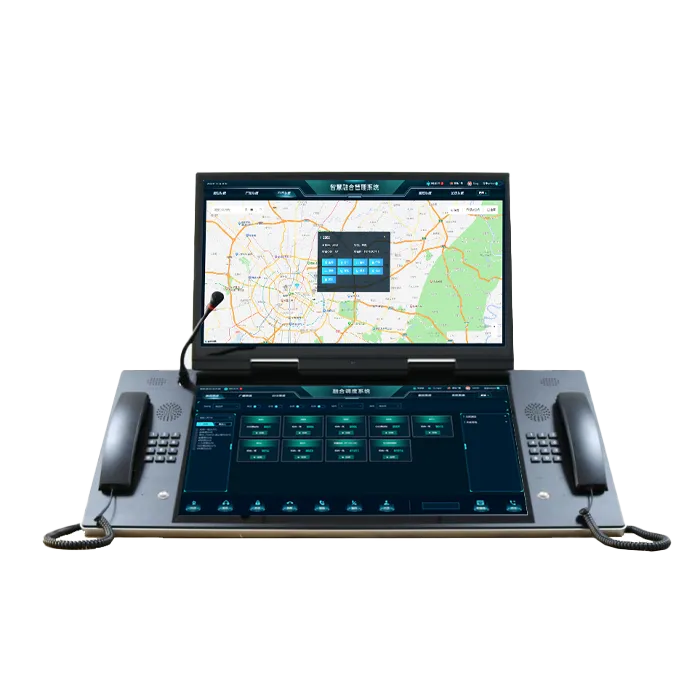
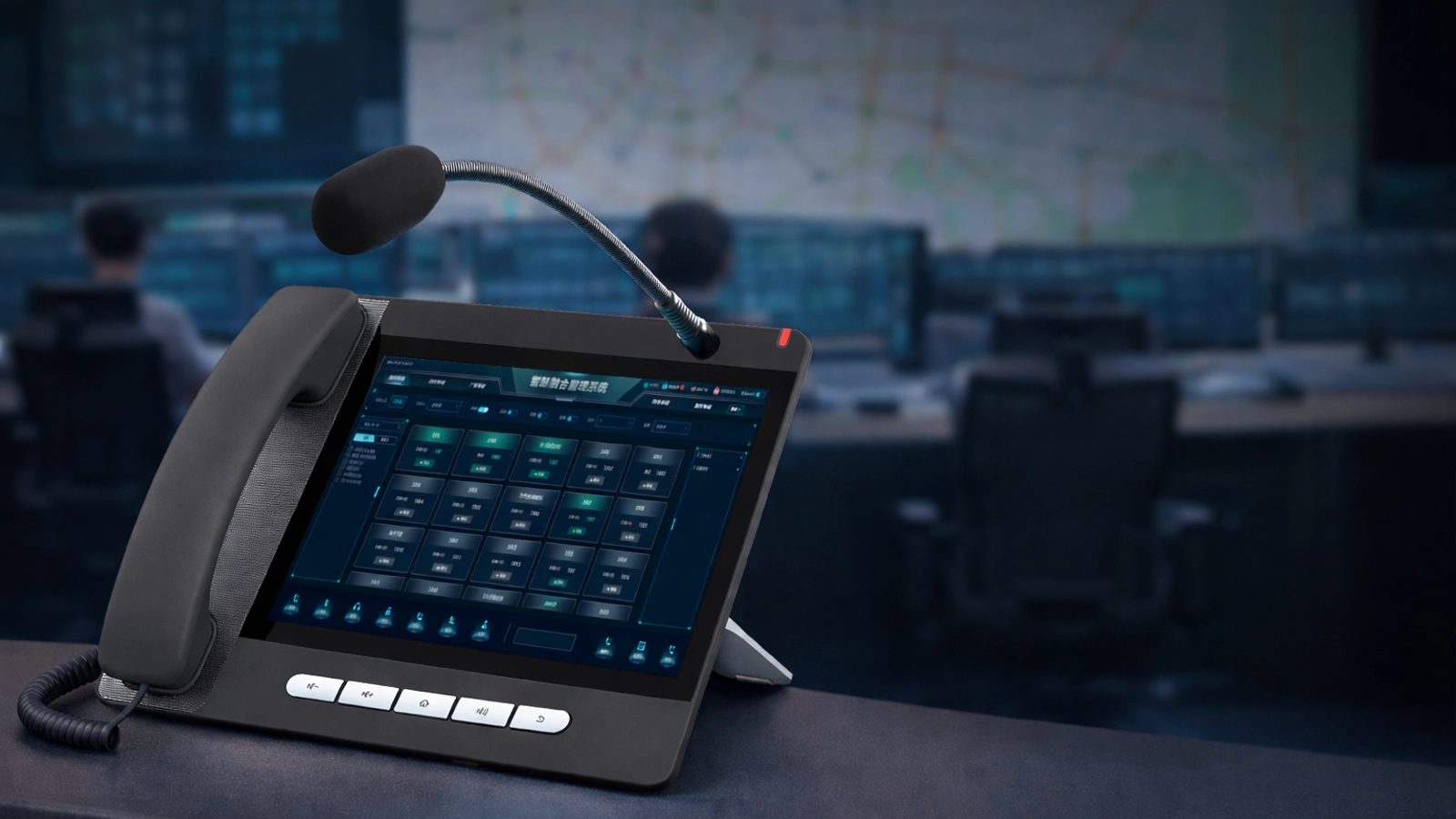
La consola de despacho es el corazón operativo del sistema. Proporciona a los operadores una interfaz visual y orientada a la acción para gestionar la comunicación. En lugar de depender del comportamiento de un teléfono de escritorio ordinario, el operador ve colas de llamadas, información de origen, estado de los terminales, recursos de contacto y acciones disponibles en un solo lugar. Esto mejora la velocidad, pero también mejora el control. Los operadores pueden gestionar más tareas de comunicación a la vez sin perder de vista lo que está activo, lo que está en espera y lo que requiere escalamiento.
La consola de despacho también puede servir como una superficie de coordinación en lugar de solo una pantalla de gestión de llamadas. Los operadores pueden usarla para lanzar conferencias, iniciar difusiones grupales, responder a alarmas, abrir vídeo vinculado, localizar una fuente en el mapa o transferir la comunicación a otro rol de mando. Es por esto que la consola es tan importante. Es donde la telefonía se convierte en despacho.
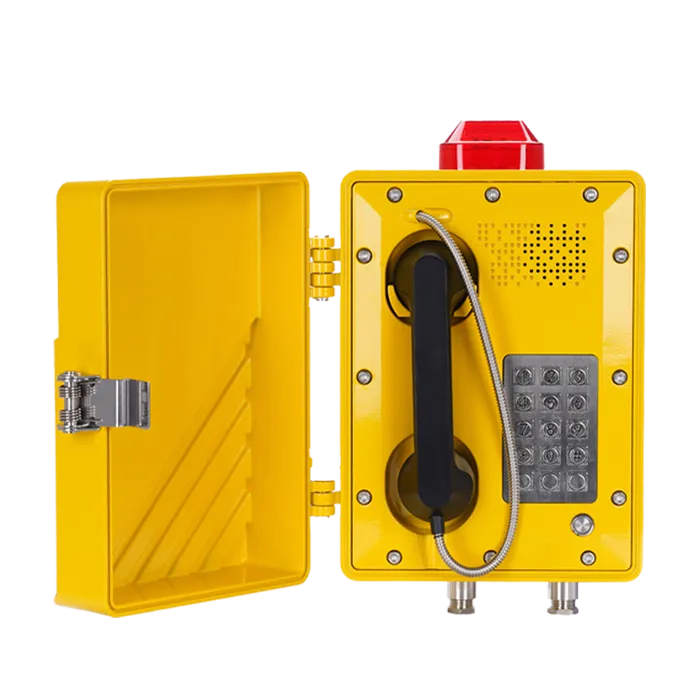
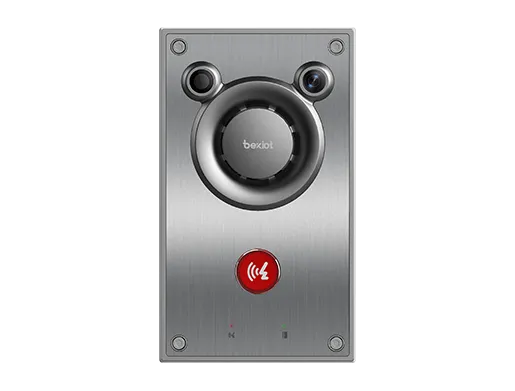
Una solución adecuada para centros de mando no se limita a los teléfonos de escritorio. Puede incluir dispositivos de interfonía, terminales de megafonía, micrófonos SIP, puntos de ayuda, altavoces IP y terminales de campo que necesitan ser accesibles desde el mismo entorno de comunicación. Cuando estos recursos se integran en la misma plataforma de despacho SIP, la organización obtiene una arquitectura de voz más unificada. Los operadores ya no necesitan un sistema para telefonía, otro para interfonía y otro para megafonía. En su lugar, pueden gestionar todos estos recursos de comunicación desde una misma lógica de despacho.
Esta capa de recursos integrada también respalda la modernización práctica. Las líneas, troncales o rutas heredadas existentes se pueden conectar mediante pasarelas cuando sea necesario, mientras que los dispositivos SIP más nuevos y los terminales de software funcionan de forma nativa en el mismo entorno. Esto hace que la plataforma sea útil tanto para proyectos nuevos como para actualizaciones por fases.
El sistema soporta un diseño de enrutamiento centralizado para que los diferentes tipos de comunicación puedan gestionarse de manera diferente. Las llamadas externas pueden enrutarse primero al centro de despacho y luego distribuirse según rol, período de servicio o área de responsabilidad. Las líneas directas pueden sonar directamente en puestos de operador seleccionados. Las comunicaciones VIP o de emergencia pueden recibir mayor prioridad que las llamadas de servicio ordinarias. Las llamadas no deseadas o restringidas pueden filtrarse mediante políticas de listas blancas y negras. La lógica IVR se puede utilizar cuando sea necesario para guiar las llamadas entrantes antes de que lleguen a la capa de operador.
Este tipo de flexibilidad de enrutamiento es una de las ventajas más importantes de una plataforma de despacho. Significa que el sistema de telefonía puede reflejar cómo funciona realmente el centro de control en lugar de forzar al centro de control a adaptar su flujo de trabajo a un modelo PBX genérico.
La visualización de colas es esencial en salas de control con mucha actividad. Los operadores necesitan saber qué está sonando ahora, qué está en espera, qué se ha perdido y qué nivel de urgencia tiene cada evento de comunicación. La plataforma de despacho presenta esta información claramente para que la gestión de llamadas sea más manejable y disciplinada. En lugar de reaccionar a ciegas, los operadores pueden trabajar a partir de una imagen de comunicación visible.
Esto también mejora la coordinación del equipo dentro de la sala de control. Los supervisores pueden ver la presión de la comunicación más fácilmente, los operadores pueden distribuir la carga de trabajo de manera más racional y el centro puede mantener una mayor continuidad del servicio durante los períodos de mayor actividad o picos de incidentes.
En entornos de mando, las llamadas a menudo necesitan moverse rápidamente entre roles. Una comunicación de campo puede comenzar con un despachador y luego necesitar ser transferida a un supervisor, un ingeniero de guardia técnico, un coordinador de respuesta u otro rol especializado. El sistema soporta estos movimientos a través de funciones de retención, transferencia y estacionamiento de llamadas diseñadas para ser simples y rápidas de usar para los operadores.
Estas funciones son importantes porque las salas de control a menudo operan bajo presión de tiempo. Si la gestión de la comunicación se vuelve torpe, todo el proceso de despacho se ralentiza. Un sistema de despacho telefónico robusto asegura que mover llamadas dentro de la organización siga siendo fluido, visible y operativamente seguro.
Estas son algunas de las capacidades más específicas de despacho del sistema. No son funciones cotidianas de oficina, pero son muy valiosas en los centros de control. El monitoreo permite a un supervisor o despachador escuchar una comunicación activa cuando está autorizado. La intrusión permite que un rol de control entre en una llamada en curso cuando se necesita una intervención. La separación permite dividir a las partes de la comunicación cuando la estructura actual de la conversación ya no es apropiada. El susurro hace posible guiar a un lado de la comunicación sin que el otro escuche la instrucción.
Estas funciones son especialmente útiles en entornos de alta presión o supervisados donde la calidad de la comunicación y la dirección de la comunicación importan tanto como la propia conexión de la llamada. Dan a los centros de mando un control en tiempo real mucho más fuerte sobre la comunicación activa.
La plataforma soporta conferencias multipartita para consultas de mando, coordinación rápida y toma de decisiones en grupo. Los operadores pueden crear una conferencia bajo demanda, agregar terminales seleccionados o números externos, silenciar participantes específicos, eliminar participantes innecesarios y finalizar la conferencia cuando la tarea esté completa. Esto ayuda al centro de control a pasar rápidamente de una llamada entrante a una sesión de coordinación más amplia cuando el evento requiere que varios roles hablen juntos.
La capacidad de conferencia es particularmente importante porque muchos incidentes no pueden resolverse mediante un solo operador y un solo interlocutor. Requieren una consulta rápida entre roles, y la plataforma de despacho telefónico debe soportar eso directamente en lugar de depender de herramientas de reunión separadas.
Más allá de la comunicación interactiva, el sistema soporta comunicación de voz de uno a muchos. Los operadores pueden lanzar difusión por zona, megafonía pública, transmisiones de emergencia y distribución selectiva de voz a grupos de terminales o áreas de servicio elegidos. Esto hace que la plataforma sea adecuada no solo para responder a la comunicación, sino también para emitirla.
El contenido de la difusión puede ser voz en vivo del operador o tareas de audio preconfiguradas. Dependiendo de los requisitos del proyecto, el sistema también puede soportar anuncios programados por tiempo, acciones de difusión activadas por número y comandos de difusión inmediata. Esto es útil para avisos operativos rutinarios, instrucciones urgentes y comunicación de respuesta a eventos.
Cuando ocurre un evento de alarma, la plataforma puede mostrar el origen, estado, hora y acciones de comunicación relevantes en la interfaz de despacho. Los operadores pueden reconocer la alarma, verificar el origen, abrir la comunicación vinculada y escalar el evento según el procedimiento. En lugar de tratar las alarmas como notificaciones separadas del sistema, la plataforma de despacho las convierte en flujos de trabajo de comunicación interactivos.
Esta función es particularmente valiosa en los centros de mando porque reduce la brecha entre la conciencia de la alarma y la acción del operador. Ayuda a la sala de control a responder más rápida y consistentemente a la comunicación impulsada por eventos.
El sistema puede asociar llamadas y alarmas con uno o más canales de vídeo. Cuando un evento entra en la plataforma de despacho, el vídeo vinculado puede abrirse automáticamente para que el operador pueda verificar la situación visualmente. Esto mejora el juicio, reduce la incertidumbre y facilita la decisión sobre qué tipo de comunicación o escalamiento debe seguir.
La verificación visual es especialmente útil en sitios grandes, entornos de transporte, salas de control industrial y operaciones sensibles a la seguridad donde la escena circundante importa tanto como el contenido de la voz.
La capa de mapas electrónicos permite que los terminales, puntos de llamada y fuentes de alarma se muestren en un diseño visual geográfico o de instalaciones. Los operadores pueden identificar la ubicación del terminal directamente en el mapa y realizar acciones de despacho desde esa misma interfaz visual. Esto es mucho más intuitivo que depender solo de números de extensión o listas estáticas de terminales.
La integración con mapas mejora la velocidad de despacho porque conecta la comunicación con la ubicación. En grandes campus, plantas, instalaciones de transporte y entornos de mando con múltiples edificios, eso puede marcar una gran diferencia.
La plataforma soporta grabación de comunicaciones, registros de eventos, registros de acciones del operador y trazabilidad histórica. Esto es importante para la supervisión, revisión de servicios, análisis de incidentes y cumplimiento de los procedimientos de control interno. La grabación y el registro también mejoran la responsabilidad porque permiten a la organización comprender cómo se gestionó la comunicación, no solo que ocurrió.
En entornos de centro de mando, este registro a menudo se convierte en parte del proceso de revisión de eventos más amplio, lo que hace que una grabación robusta y una gestión de registros sean una característica principal en lugar de un accesorio.
Los centros de control no siempre mantienen las mismas condiciones de personal. Durante los turnos de noche, transiciones de personal o períodos temporalmente sin atención, la plataforma puede aplicar reglas de desvío automático y de servicio para que la comunicación entrante se enrute correctamente. Esto ayuda a mantener la continuidad operativa y reduce el riesgo de pérdida de comunicación durante períodos de poco personal o de transición.
Las funciones de continuidad son especialmente útiles en organizaciones donde las funciones de mando permanecen activas las 24 horas del día, incluso si la densidad de operadores cambia con el tiempo.
La solución está diseñada para soportar integración externa a través de API, SDK e interfaces de plataforma. Esto hace posible conectar la capa de despacho telefónico con sistemas de alarma, plataformas de monitorización, aplicaciones de negocio, aplicaciones móviles, motores de flujo de trabajo y futuros proyectos de software para centros de mando. En lugar de convertirse en una isla telefónica cerrada, la plataforma puede servir como parte de un ecosistema de mando y control más amplio.
Esto también mejora el valor a largo plazo. A medida que el centro de control evoluciona, la plataforma de despacho telefónico puede seguir participando en nuevos flujos de trabajo en lugar de necesitar ser reemplazada cada vez que se introduce un nuevo sistema.
La plataforma puede soportar un despliegue distribuido en múltiples puestos, salas o sitios de mando. Esto facilita la construcción de entornos de supervisión más grandes mientras se mantiene una lógica de comunicación coherente. La organización puede comenzar con un despliegue enfocado y expandirse más tarde sin abandonar la arquitectura original.
Los centros de mando dependen de la estabilidad de la comunicación. El sistema está diseñado para soportar entornos de servicio de larga duración donde la comunicación debe permanecer predecible en medio del tráfico rutinario, los períodos de alta actividad y los eventos urgentes. Esta estabilidad no es solo técnica. También es operativa. Las colas, conferencias, alarmas, difusiones, grabaciones y reglas de servicio deben seguir funcionando de manera clara y manejable a medida que la presión cambia.
Estos centros necesitan gestión rápida de llamadas, capacidad de conferencia, interacción con alarmas y trazabilidad completa de eventos. La plataforma soporta tanto la comunicación de mando rutinaria como la coordinación impulsada por incidentes dentro de un mismo entorno.
En entornos de mando de seguridad, la telefonía a menudo necesita trabajar estrechamente con alarmas, interfonía, CCTV y mapas. La plataforma ayuda a los operadores a pasar sin problemas de la comunicación a la verificación y luego a la respuesta coordinada.
Estos entornos requieren continuidad en la comunicación, coordinación de voz en grupo, acciones de despacho vinculadas a eventos y gestión visual de terminales. La plataforma es muy adecuada para estos casos de uso operativamente densos.
Los grandes centros de coordinación de transporte y ciudades generalmente requieren comunicación multirol, integración más amplia y flujos de trabajo de operador estructurados. La solución soporta estas necesidades dentro de una única arquitectura de despacho basada en SIP.
El sistema proporciona a los operadores una forma más clara de recibir, clasificar y actuar sobre las comunicaciones. Esto reduce los cambios innecesarios entre herramientas y ayuda al centro de control a mantener un proceso de despacho más disciplinado.
Debido a que las conferencias, la megafonía, la vinculación de alarmas, el vídeo en vivo y la coordinación basada en mapas están disponibles desde la misma plataforma, el centro de control puede pasar del contacto por voz a la acción coordinada más rápidamente.
La grabación, los registros, la continuidad no atendida y las interfaces de integración abierta ayudan a la organización a mejorar la responsabilidad hoy mientras mantienen la plataforma lista para futuras aplicaciones y crecimiento del sistema.
El Sistema de Despacho Telefónico IP para Centros de Mando y Control es más que una plataforma de telefonía IP. Es un sistema de comunicación orientado al despacho que ayuda a los operadores a recibir, priorizar, intervenir, conferenciar, difundir, verificar y registrar la comunicación a través de un flujo de trabajo unificado.
Al integrar el control de llamadas SIP, consolas de despacho, gestión avanzada de operadores, conferencias, difusión, megafonía, vinculación de alarmas, ventana emergente de vídeo, mapas electrónicos, grabación e interfaces abiertas, el sistema crea un entorno de comunicación más práctico y controlable para los centros de mando. El resultado es flujos de trabajo más claros, una coordinación más sólida y una mejor gestión de la comunicación tanto en operaciones rutinarias como en eventos críticos.
Un IPPBX normal soporta principalmente telefonía empresarial, mientras que un Sistema de Despacho Telefónico IP añade visibilidad de colas, gestión por prioridades, intervención avanzada, conferencias, megafonía, vinculación de alarmas, integración con mapas y flujos de trabajo de despacho orientados al operador.
Una consola de despacho proporciona a los operadores una interfaz de trabajo más rápida y clara para gestionar colas, controlar comunicaciones, lanzar conferencias, gestionar alarmas y coordinar acciones bajo presión.
Sí. El sistema puede vincular la comunicación con eventos de alarma, canales de vídeo en vivo y ubicaciones de terminales en mapas para que los operadores comprendan el contexto y coordinen la respuesta más rápidamente.
Sí. Puede soportar difusión por zona, megafonía, anuncios rutinarios y transmisiones de emergencia dependiendo del diseño del proyecto y la configuración de los terminales.
Cuando el personal operador se reduce o la consola no está atendida, el sistema puede enrutar la comunicación entrante de acuerdo con las reglas de servicio predefinidas, ayudando a mantener la continuidad sin perder la trazabilidad de la comunicación.
Es adecuada para centros de mando de emergencias, centros de operaciones de seguridad, centros de gestión de tráfico, salas de control de servicios públicos, centros de control industrial, centros de mando aeroportuario y ferroviario, y otros entornos de coordinación basados en servicio.